Authentication
Welcome to the PicPay One-Click authentication flow documentation. On this page, we will explain how to authenticate and access our services.
info
The PicPay One-Click solution is not available to all our merchants. Interested? Just contact us by email: pic.premium@atendimento.picpay.com
Getting the client_id and client_secret#
After registering the application, PicPay will share the access credentials with the e-commerce in the form of a client_id and client_secret.
More about the client_id#
The client ID is a publicly exposed string used by the service API to identify the application and also to create authorization URLs that are presented to users.
More about the client_secret#
The client secret is used to authenticate the app's identity to the service API when the app requests access to a user's account, and should be kept private between the app and the API.
How does it work?#
The basic authentication and authorization flow consists of generating a code after the user enters their login/password in a PicPay interface.
With the generated code, the e-commerce must generate a token that will be used in all server to server communication with PicPay. This token will enable the user to perform the following operations (depending on the configured scope):
- Process payments;
- Refund payments;
- Get user information;
Redirecting user to the PicPay app#
Initially, your e-commerce should redirect your customers to the PicPay app. For this, your e-commerce must generate the URL, which should contain your client_id and redirect URL.
Url example:

Brief explanation of the URL parameters above:
client_id: Application identifier provided by PicPay;redirect_uri: Redirect URL where the service redirects the user agent after granting an authorization code.response_type: Must be equal tocode, specifying that your application is requesting an authorization code grant.state: A sequence of characters used to associate the consumer service session with a session identifier, helping to prevent replay attacks. It can be a random value, as long as it is not easy to guess. Although not mandatory, the use of this feature is recommended.
Requesting user authorization#
By using the URL from the previous step, the customer will be redirected to the PicPay app to perform biometric verification and complete the connection consent flow.
Attention
The customer may or may not grant permissions. Your application must be prepared to receive both types of responses.
After initial consent, PicPay will not request permissions from the customer again.
Getting the authorization code#
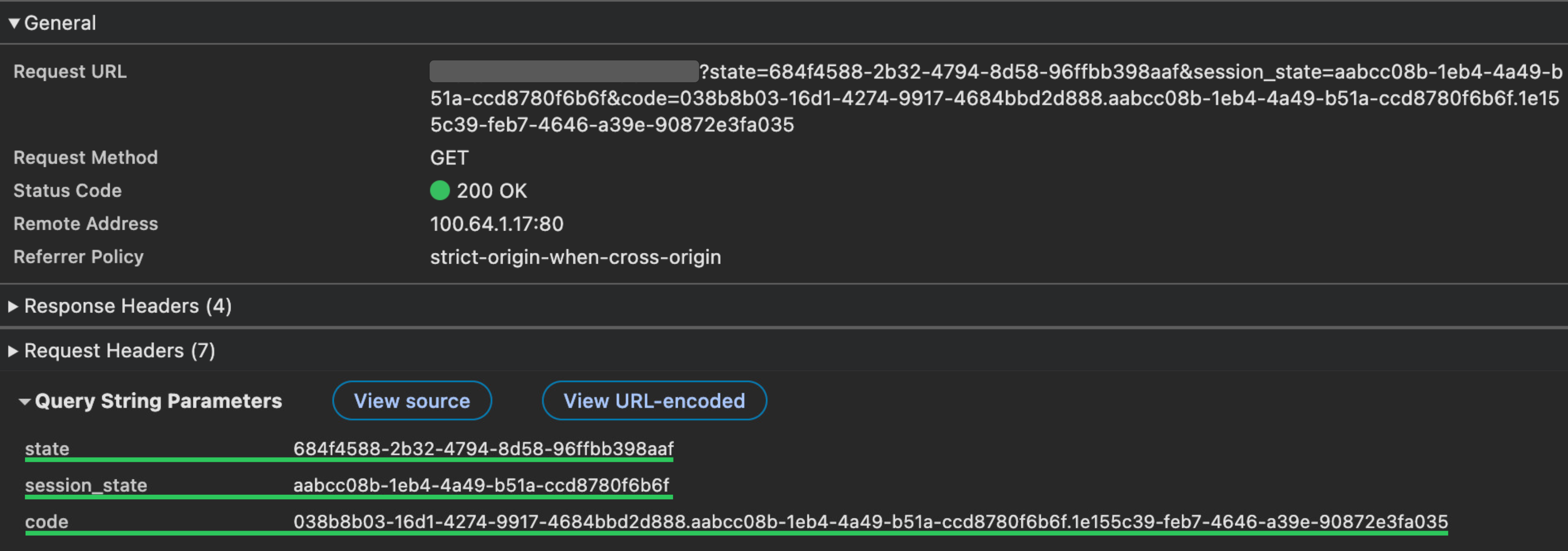
If the customer authorizes the application in the previous step, the user will be redirected to the indicated return URL.
The authorization code will be sent as a parameter along with the indicated URL and must be used to generate tokens in the next step.
Token request#
To make payment, refund, or information query requests, the e-commerce must provide a valid token as one of the header parameters for each request.
Therefore, the e-commerce must request an access token with the authorization code obtained, the client_id, the client_secret, and the same redirect_uri provided in the authorization step.
Example token request:
If everything is correct, we will send the token as in the example below:
Token expiration time
The token expiration time will be displayed in seconds. After expiration, the token must be refreshed using refresh_token.
The duration of the tokens can be configured during the creation and configuration of credentials by PicPay.
Refreshing tokens#
After a predetermined period, the access_token granted to the application will expire, requiring a request for a new access_token. For this, a refresh_token is used, generated in the same request as the access_token (see Authentication and Authorization). Below is an example request:
Token refresh flow
The token refresh flow must be implemented in your application since the refresh_token will expire at some point.